


Kohler Energy Management
3.8143.00 Reviews
App Specs
- Version
- 1.5.202606
- Updated On
- License
- Free
- Downloads
- 10,000+
- Developer
- Discovery Energy, LLC
- Categories
- House & Home
- Platform
- Android
Screenshots
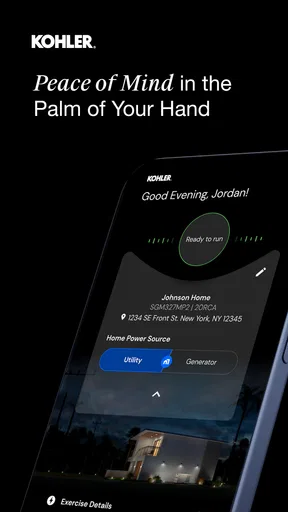
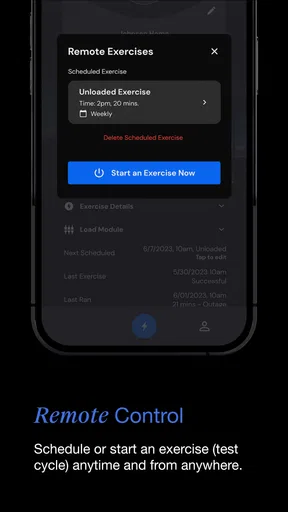
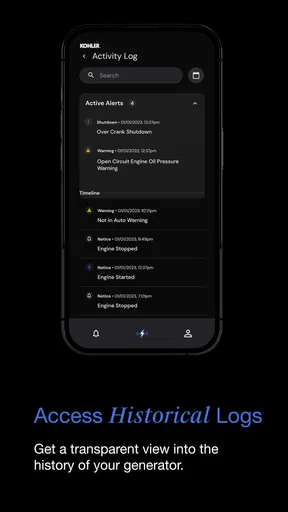
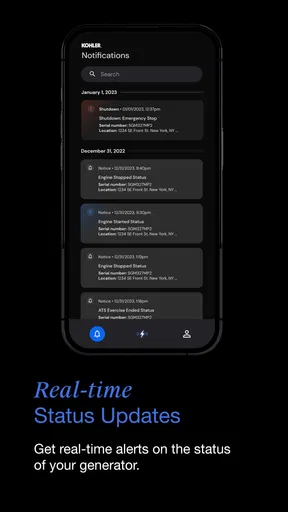
 Analysis by AppCompare
Managing a home generator is one of those jobs I prefer to finish before I actually need the generator. Kohler Energy Management is aimed at that exact moment: the quiet period when I want to check the equipment, understand its status, and keep household backup power from becoming a last-minute scramble. It is a free House & Home app from Discovery Energy, LLC, with an Everyone age rating, and its purpose is narrower than a general smart-home dashboard.
That narrow focus is both its appeal and its limitation. If you own a compatible Kohler home generator, the app gives you a more direct place to think about generator management than a paper manual, a phone contact, or a collection of unrelated smart-home tools. If you do not have the relevant Kohler equipment, there is little reason to install it simply to explore. I found it most useful when treated as part of a maintenance routine rather than as an entertainment app or an all-purpose home-control center.
From a quiet generator check to a clearer household routine
I find the most useful way to judge a generator app is by whether it helps turn an occasional check into a routine I can actually keep. For a household with compatible Kohler equipment, that means deciding when to look, who should notice an unusual status, and what information to have ready before calling for help. The next section looks at how the app fits into those everyday handoffs without making it the whole backup-power plan.
The starting condition: a generator that is easy to forget
A standby generator can sit outside for long stretches without demanding attention. That is convenient, but it also creates a practical risk: I may remember that the generator exists while forgetting the small checks that make it useful when the power fails. An app built specifically for homeowner generator management changes the starting point by putting the equipment closer to the device I already carry.
My first recommendation is to approach the app with the generator’s documentation and installation details nearby. The app is not a substitute for knowing which unit is installed, who services it, or what the household expects it to power. That information still matters when something needs repair or when a prolonged outage requires decisions about fuel, loads, and contact with a professional.
The product has a focused identity: the store summary describes it as being for homeowner generator management, while the short description identifies Kohler Energy. That tells me what not to expect. I would not install it looking for lighting scenes, thermostat controls, security-camera viewing, or a broad home automation system. Its value depends on the generator workflow, not on the number of unrelated controls it can gather into one screen.
Step one: prepare the handoff between the homeowner and the equipment
The first meaningful handoff is between me and the installed generator. A phone app can present information, but it cannot correct an installation problem, replace a service visit, or make an unsuitable generator suitable for a particular house. I still need to identify the equipment correctly and understand which actions are ordinary homeowner checks and which belong to a qualified technician.
Worth Reading Before You Choose

EA SPORTS FC Mobile 26 Is a Bigger Football Game, but It Takes Time

Flipboard Shows What News Apps Must Do Beyond the Feed

Switching to Android Auto Means Rethinking Your Driving Routine

Google Calendar Makes a Crowded Week Easier to Manage

Ludo King Makes the Most of the Minutes Between Plans

Baby Panda World Brings Quick Play to Modern Phones, but Its Game Library Feels Busy
This is where a little discipline helps. I would use the app during a calm daytime check, not for the first time during a storm. I would also make sure the phone is running a supported operating system; the published minimum is Android 6.0. That requirement is modest, but older devices can still bring their own issues, including poor battery life, outdated system components, or unreliable connectivity.
Because the application is free, the initial decision is easy financially. The more important question is compatibility and usefulness. A free download is not the same as a free generator service, and it does not remove the need for maintenance, safe operating habits, or professional help. I see the app as an access point to generator information, not as a promise that every generator-related problem can be solved from a screen.
Step two: use the app before an outage, not only during one
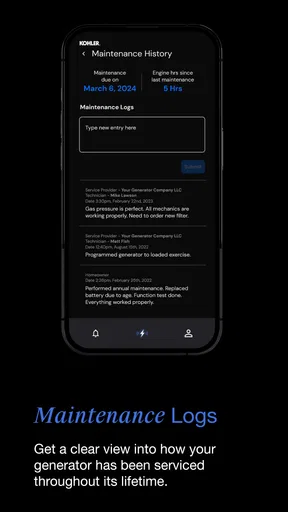
The strongest workflow is preventive. I would open the app when the generator is not urgently needed, review what it shows, and use that moment to connect the digital information with the physical equipment outside. If the app identifies a condition that needs attention, I have time to consult the manual or contact the installer instead of making a rushed decision in darkness or bad weather.
A useful habit is to make the check part of another household routine. For example, after checking smoke alarms or reviewing emergency supplies, I could look at the generator’s status in the app. That creates a simple handoff from general home preparedness to backup-power preparedness. The app becomes more valuable when it is used repeatedly enough that an unusual message stands out from the normal state.
I would also avoid treating a normal-looking screen as proof that the entire backup plan is perfect. The generator may be ready while the household is not. Extension cords, sensitive electronics, refrigeration, medical equipment, heating, and internet access all create different practical considerations. The app can help me manage the generator, but I still need a household plan for what happens when the power disappears.
Step three: turn an alert or status change into an action
The important moment is not merely seeing information; it is deciding what that information means. If the app presents an issue, I would first read the wording carefully and compare it with the generator’s manual. Some conditions may call for a routine check, while others may justify contacting the installer or service provider. Guessing from a short message is a poor substitute for understanding the equipment.
This is one of the app’s practical trade-offs. A dedicated generator app can make the first signal easier to notice, but the signal may still require outside knowledge. The handoff moves from the app to documentation, then possibly to a technician. That is not a failure of the app; it is a reminder that software is only one stage in a mechanical and electrical system.
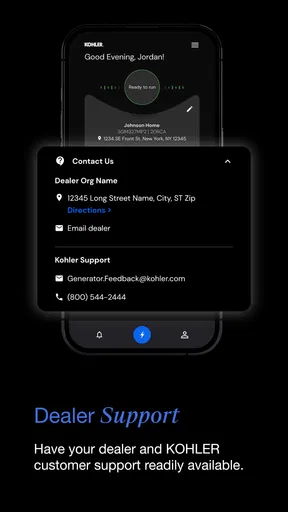
I would keep the service contact details somewhere separate from the app as well. If a storm affects mobile service, the phone loses power, or I cannot access an account, a written record can save time. This is a small but non-obvious improvement to the workflow: the app is the convenient daily view, while the paper or offline plan is the fallback when convenience fails.
The handoffs that matter in everyday use
Generator management usually involves more than one person. A homeowner may notice a status change, another family member may be present during an outage, and a technician may ultimately perform the repair. The app sits in the middle of those handoffs, so I would not assume that everyone in the household understands the same terms or knows which action is safe.
For a shared home, I would agree in advance on who checks the app and who contacts the service provider. That avoids two common problems: nobody acts because each person assumes someone else is handling it, or several people make separate calls with different descriptions of the same issue. A screenshot or carefully written status description can help communicate what appeared, but I would avoid presenting an interpretation as a diagnosis.
This is also where the app compares favorably with a paper-only routine. Paper instructions are valuable and should remain available, but they do not provide the same immediate connection to a phone-based check. On the other hand, paper is easier to share during a power or connectivity problem. I would use both rather than choosing one as a complete replacement for the other.
A realistic scenario: preparing for a forecasted storm
Imagine that I see a storm forecast for the weekend. Before the weather worsens, I open Kohler Energy Management and check the generator’s current information. I then walk outside to confirm that the physical unit is accessible and that nothing has been placed around it since the last inspection. If the app shows an issue, I deal with it while normal services are still available instead of waiting for an outage.
Next, I tell the household who will monitor the generator if the power goes out. I make sure the service contact and the paper instructions are easy to find, and I review which appliances are priorities. None of those steps is glamorous, but together they turn the app from a passive status screen into one part of a usable plan.
If the outage arrives, I can use the app as an early reference point rather than repeatedly going outside to guess what is happening. If the displayed condition calls for professional attention, I have a clearer starting description for the call. If everything appears normal, I still know that the app is reporting the generator side of the situation, not the full condition of the house or the utility network.
What the result looks like when the workflow works
The best outcome is not that I spend more time inside the app. It is that I spend less time wondering what to do. A good generator-management routine gives me a clearer sequence: check the status, compare unusual information with the documentation, decide whether the issue is mine to handle, and pass it to the right person when it is not.
That is where the app earns its place. It helps bring generator awareness into an ordinary phone-based routine, which is more convenient than relying entirely on memory. For a homeowner who already owns compatible Kohler equipment, this can make preparedness feel less abstract. The generator becomes something I can check deliberately instead of something I remember only when the lights go out.
The current version is listed as 1.5.202606, and the app has reached over ten thousand installs. Its average rating is 3.8 from around two hundred fifty ratings, with more than one hundred forty written reviews. I read that overall picture as mixed but useful: the app clearly serves a real audience, while the experience may depend heavily on the user’s equipment, setup, connectivity, and expectations.
Where the flow breaks: connectivity, interpretation, and scope
The first weak point is the boundary between digital visibility and physical reality. If the phone cannot communicate properly with the equipment or the relevant service, the app cannot provide the reassurance I want. Even when information appears, I still need to interpret it responsibly. A homeowner expecting the app to diagnose every mechanical issue or guide every repair is likely to be disappointed.
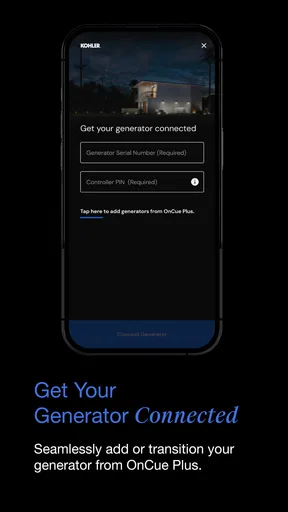
The second weak point is setup friction. A generator app is inherently more specialized than a general home app, so the initial experience may feel less immediately useful to someone who is only browsing. The benefit arrives after the equipment and the app are connected in a meaningful household workflow. That makes it a sensible tool for an owner, but a poor casual download for someone without a Kohler generator to manage.
The third weak point is emergency dependence. During an outage, the phone may have limited battery, the internet connection may be unreliable, and family members may need information quickly. I would not make the app the only source of instructions. Keeping the generator manual, service contact, and household priorities available offline is not redundant; it is good preparation.
There is also a human limitation. A status update can encourage confidence, but it cannot tell me whether the house is using power sensibly, whether a medical device has adequate backup, or whether conditions outside are safe. The app should support decisions, not replace them. That distinction matters most when the outage lasts longer than expected.
Who should use it, and who should choose something else
I would recommend Kohler Energy Management to a homeowner with a compatible Kohler generator who wants a dedicated way to include generator checks in a regular preparedness routine. It is especially suitable for people who prefer seeing equipment information on a phone and who are willing to combine that convenience with the manual and professional service process.
I would be more cautious about recommending it to renters, people without a Kohler generator, or anyone looking for a complete smart-home control center. A broader home-management platform may be better when the main goal is controlling lights, climate, cameras, locks, and energy devices together. A paper checklist may be better for a household that values offline simplicity above digital access.
It is also not the right choice for someone seeking a repair guide. Generator work can involve serious electrical and mechanical hazards, and an app focused on homeowner management should not be treated as permission to experiment. When the next step is unclear, the safer handoff is to the documentation or a qualified service professional.
My final take on the complete workflow
I like the app most when I judge it by the job it is actually trying to do. It is not a replacement for the generator, the installer, the service provider, or a household emergency plan. It is a focused bridge between the homeowner and a Kohler backup-power system, helping move a check from “I should probably look at that” to a repeatable action.
The free price and Everyone rating make it easy to try, while its focused category makes the decision straightforward: generator owners should assess it as a management tool, and everyone else can safely ignore it. Discovery Energy, LLC has placed the emphasis where it belongs for this kind of product—on the homeowner’s relationship with the generator rather than on unrelated home features.
My advice is to install it before you need it, test your routine during normal conditions, and decide in advance how an unusual status will be handed off. Keep offline instructions and service details nearby, and do not confuse a convenient app view with a complete diagnosis. Used that way, Kohler Energy Management is a practical companion for preparedness: not spectacular, but potentially valuable when a quiet check today prevents a confused response tomorrow.
Pros
- Monitors household energy use in one convenient mobile dashboard.
- Can help identify unusual consumption and potential energy waste.
- Supports more informed decisions about backup power usage.
- Useful for tracking system status when away from home.
- Clean interface makes essential energy information easy to find.
Cons
- Requires compatible Kohler equipment to provide meaningful functionality.
- Some features may depend on an active internet connection.
- Remote monitoring can be limited during outages or network disruptions.
- Energy data may take time to update rather than appearing instantly.
- Initial setup may require technical knowledge or professional assistance.
FAQs for Kohler Energy Management
What is Kohler Energy Management used for?
Kohler Energy Management is designed to help users monitor and manage compatible Kohler power systems, such as standby generators and related energy equipment. Depending on the supported hardware and installation, the app may provide information about operating status, power availability, alerts, maintenance needs, and system performance. Its usefulness depends on having a compatible Kohler device and a properly configured connection.
Does Kohler Energy Management work with every Kohler generator?
No. Compatibility can vary depending on the generator model, controller, communication equipment, installation configuration, and the services available in your region. Before downloading, users should check the official Kohler compatibility information or consult their installer. Some older systems may require additional hardware, firmware updates, or professional setup before they can communicate with the application.
Can I control my generator remotely with the app?
Remote control features depend on the specific Kohler equipment and account configuration. In supported installations, the app may allow users to view system status, receive notifications, and access selected management functions remotely. It should not be treated as a replacement for professional maintenance or emergency procedures. Always follow Kohler’s safety instructions and use the generator’s approved controls when required.
Does Kohler Energy Management require an internet connection?
An internet connection is generally needed for remote monitoring, cloud synchronization, account access, and push notifications. The app’s availability and the speed of updates may be affected by the generator’s communication connection, home network, mobile data, or temporary service interruptions. If connectivity is lost, the generator may continue operating locally, but remote information and alerts could be delayed or unavailable.
Is Kohler Energy Management free to download and safe to use?
The application may be available to download without an upfront charge, although certain monitoring services, equipment requirements, installation work, or subscription-related features can vary by product and location. Download it only through an official app store and use the correct Kohler account. Because the app can display information about a home or business power system, protect your login details and keep the application updated.


